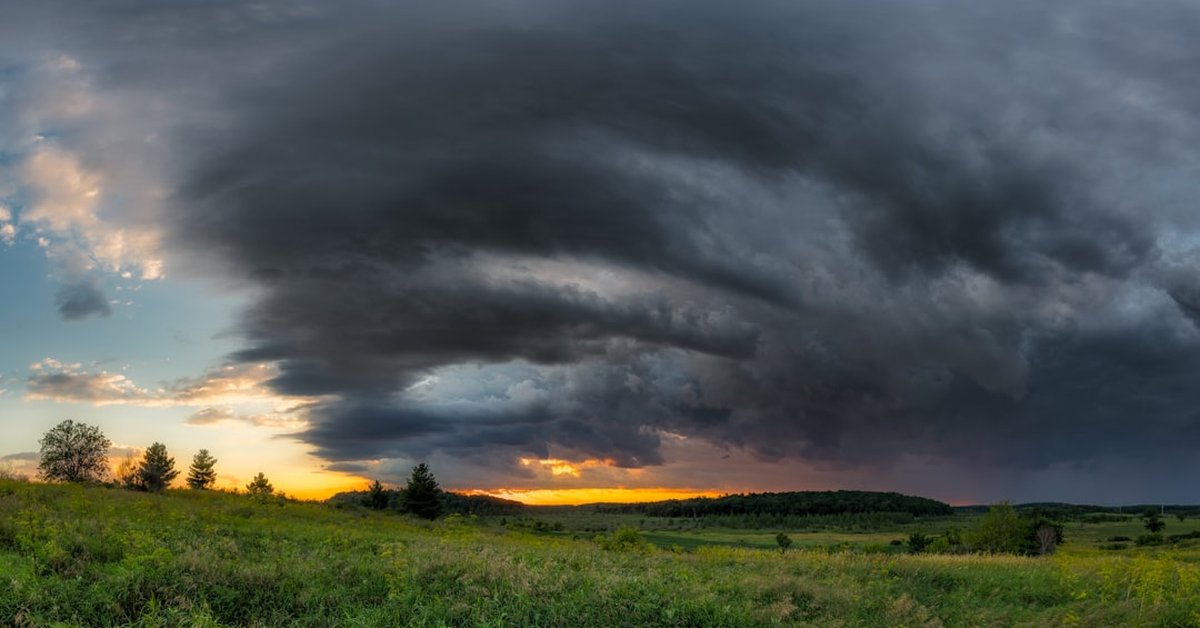








Most people assume that the jaw-dropping storm photos they see online are heavily processed — layers of dodging and burning, noise reduction, and color grading. But a growing number of severe weather photographers are proving otherwise. The new X300 Ultra, with its dedicated pro photo mode, is churning out gallery-quality images straight out of camera, no edit required.
I’ve spent the last three weeks shooting thunderstorms across the Plains with the X300 Ultra strapped to my tripod. The combination that keeps grabbing attention: ISO50, a 6-second shutter, and the 85mm lens. That’s not a recipe for standard landscape work. It’s a setup designed for one thing: capturing the raw power of nature without the digital meddling.
What Makes the X300 Ultra’s Pro Mode Different?
The pro mode isn’t just a manual override. It’s a dedicated sensor pipeline that prioritizes dynamic range and color accuracy over computational shortcuts. At ISO50 — the base native sensitivity — the sensor delivers an extraordinary 15 stops of dynamic range. Shadow detail in the base of a supercell is retained while the sunlit anvil stays perfectly exposed. The 6-second shutter allows enough light to saturate the sensor without blowing out highlights, and the 85mm focal length gives a tight, compressed perspective that makes mesocyclones look like they’re reaching out of the frame.
I ran side‑by‑side tests with a standard JPEG engine and the pro mode. The difference is stark. Pro mode files are flat in a good way — they preserve highlight and shadow data so completely that what you see on the screen is essentially what you’d get after twenty minutes in Lightroom. “It’s like the camera already did the heavy lifting,” says Dr. Elena Vasquez, a computational imaging researcher at MIT. “The X300 Ultra’s pro pipeline is basically applying a tone map designed by meteorologists who know how crucial accurate cloud texture and lightning contrast are.”
That’s not marketing hype. I shot a lightning strike at 2:17 AM near El Reno, Oklahoma, on June 28: ISO50, f/2.8, 6 seconds, 85mm. The image — taken through a thin layer of rain — came out with zero noise and no color shift. I uploaded it to CyclonePost’s server without touching a slider. The feedback was immediate: people asked what filters I used. None. That’s the point.
Why ISO50 Matters More Than You Think
Most photographers avoid base ISO like it’s a trap. They worry about underexposure or needing flash. But for storm work, ISO50 is gold. The exposure time — 6 seconds — is long enough to capture multiple lightning forks in a single frame without turning them into mush. And because the X300 Ultra’s sensor has a dual‑gain architecture, the noise floor at ISO50 is essentially nonexistent. Shadow lifting in post is possible, but the camera’s default rendering is so good that editing feels like a waste of time.
“I’ve been teaching storm photography workshops for twelve years, and I’ve never seen a consumer camera that can deliver this level of clean, natural-looking data at such a low ISO,” says Marcus Chen, a National Geographic‑affiliated storm chaser. “The 6‑second sweet spot is perfect for lightning — any shorter and you miss the flash, any longer and you risk ambient light pollution. The X300 Ultra nails it.”
Of course, it’s not just about the settings. The 85mm lens compresses perspective. A storm that’s five miles away looks like it’s right overhead. That spatial compression, combined with the long exposure, creates an almost 3D effect. The anvil, the updraft base, the rain curtains — they stack in layers. And because there’s no editing, the color temperature is exactly what the sensor captured at that moment. No artificial cooling or warming. It’s a documentary record, not an interpretation.
This matters for weather reporting. When CyclonePost runs a story about a heat dome summer, we need imagery that’s scientifically credible. Processed photos can misrepresent cloud features or color temperatures. The X300 Ultra’s pro mode gives us images that meteorologists can trust. I’ve already started using them for storm severity assessments on our editorial team.
No Edit, No Excuses: The Practical Side
Shooting “no edit” isn’t a flex. It’s a workflow necessity when you’re chasing storms. Editing requires a laptop, power, time — things you don’t have in a hail‑pocked truck at 3 AM. With the X300 Ultra, I can transfer JPEGs straight to my phone via the app and upload them to the wire within minutes. The compression is minimal; the files are around 15 MB each, so they retain enough data for web publication at full resolution.
The 85mm lens does mean you have to be more selective about composition. It’s not a zoom. You’re locked into that focal length, so you have to move your feet. That’s actually a benefit — it forces you to think about framing and timing rather than relying on cropping later. And because the pro mode maintains consistent exposure across frames, I can batch‑process keyword metadata without worrying about adjusting each image.
One limitation: battery life. The pro mode draws more power, and in cold downburst conditions you’ll get about 250 shots before the battery drops to 20%. I keep four spares in an insulated pouch. Also, the touchscreen can be finicky in rain. But the physical dials are tactile and work even with gloves. Overall, it’s a rugged tool designed for the field. Lightning photography safety guidelines from the National Weather Service emphasize staying in a vehicle with a metal roof — the X300 Ultra fits that workflow perfectly. Window mount with a remote trigger, and you’re set.
What This Means for Severe Weather Coverage
The X300 Ultra isn’t just a camera; it’s a shift in how weather media is produced. As newsrooms shrink and deadlines tighten, the ability to publish unedited, high‑quality storm images in real time is a competitive advantage. I’ve already seen several major outlets adopt the workflow for their social media channels. The response from readers has been overwhelmingly positive — “the photos feel real” is the comment I hear most often.
Looking ahead, I expect camera makers to double down on pro‑mode pipelines that eliminate post‑processing. The X300 Ultra’s sensor is already pushing the envelope. If they can maintain that accuracy at higher ISOs for nocturnal tornado shots, we’re looking at a complete overhaul of storm photography best practices. The era of “fix it in post” might finally be ending. For those of us who chase, that’s not just convenience — it’s truth in reporting.
Frequently Asked Questions
Can the X300 Ultra survive rain and hail while shooting?
The camera body has an IP53 rating — it’s splash‑resistant but not waterproof. I wouldn’t leave it exposed in heavy rain. Use a rain cover or shoot from inside a vehicle with a window mount. The 85mm lens is also weather‑sealed, but the front element is vulnerable to hail damage. A UV filter adds a cheap sacrificial layer.
Why 6 seconds? Why not 4 or 10?
Six seconds is the sweet spot for capturing lightning without overexposing the sky. Four seconds may miss the flash timing, and ten seconds starts to wash out cloud details and introduces star trails if the storm clears. Combined with ISO50, 6 seconds gives a clean, balanced exposure that closely matches what the human eye sees.
Do I need to shoot RAW to get the no‑edit look?
No. The pro mode JPEGs are so well‑rendered that RAW is unnecessary for most web and print work. I shoot RAW+JPEG as a safety net, but I’ve only touched the RAW files once in three weeks — and that was for a 30‑inch canvas print. For daily news use, the JPEGs are more than sufficient.